
The UX timeline: How long does UX design take?
You may be at a point where you’re planning to start a new project or create a feature for an existing product. You understand the importance of human-centered design and the value of investing in user experience at the beginning of your project lifecycle. One of your next questions might be, “How much time will this add to my project scope?”
Your project plan should include three months for UX
Your UX timeline won’t look the same as the next guy’s; it depends on the number and size of features and development deadlines. But in most cases, implementing a user experience process adds about three months to the front end of your project—and UX saves you from tremendous amounts of development rework typically found after release.
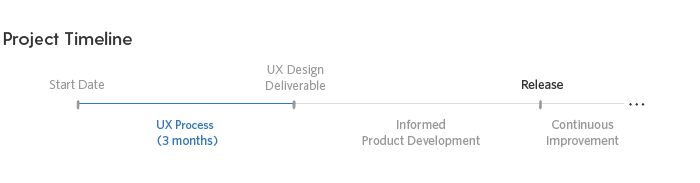
Of course, this is dependent upon your projected release date, the project scope, and a host of other factors. In cases where business deadlines are inflexible, this timeframe can be condensed a bit.
Build a solid foundation with the UX process
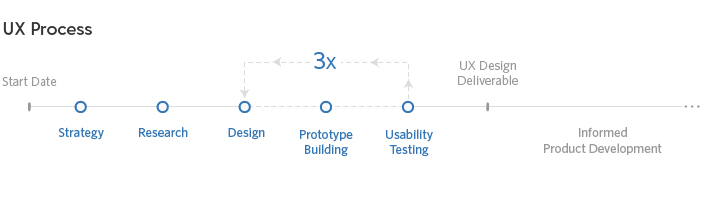
Let’s take a closer look at the UX process. What exactly is done in that three-month stretch?
Strategy
To kick off the process, strategy discussions take place: direction is decided, goals are set, and expectations are determined.
Research
UX researchers conduct in-depth interviews. The goal of this stage is to ensure that the design team thoroughly understands the users and the business goals. Personas are created.
Design
Informed by the research, the design team focuses on the needs of the personas and begins to whiteboard and wireframe solutions. They continue working and refining, and adding more detail.
Prototype Building
Following design, the concept is turned into an interactive prototype.
Usability Testing
The team then takes the prototype and conducts tests with users outside the product team. After each round of testing, the results are analyzed and the design team makes adjustments to the solution. Typically, it takes three rounds of testing to fully validate solution concepts. Once the team is confident that it has solved for the users’ goals, a final design deliverable can be handed over to developers.
Build it right the first time
Investing in UX at the beginning of your project’s life cycle does extend the initial project timeline, but as with any investment, you will reap its benefits later. Your team will be able to move away from opinion-based product decisions to data-driven ones. You will be able to launch your product with confidence—knowing that your solutions have been vetted with real users. It’s also cheaper to iterate in the design phase than it is to rewrite production code.
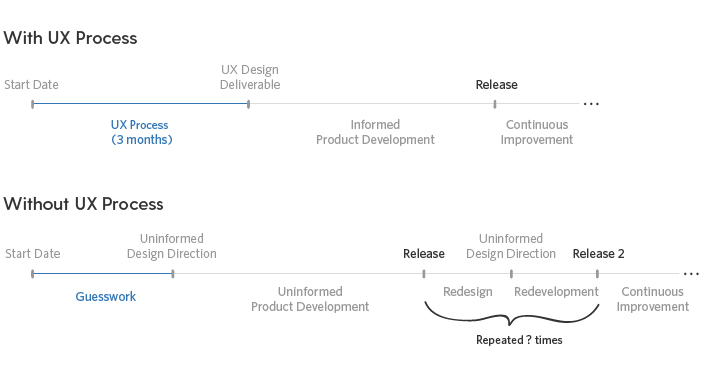
Let’s compare a project timeline which includes a UX process to one without.
Informed solutions & clear direction
When product teams make users the basis for decisions, the result is an informed design solution. Because there are researched, tested, and documented reasons behind interfaces and interaction patterns, development teams have clarity around what they need to produce and why. Without a documented UX design, developers may gravitate towards the most efficient path to quickly make the system work. At first that may sound great, but often times, “easy” for the development team may not mean “easy” for the end user. If you wait for the first release to uncover such usability issues, you put your customers in the middle of problem solving and, ultimately, provide a sub-par experience.
The result is a stressful post-release. The team finds itself in a cycle of redesign and redevelopment with significant constraints. Once a user interface has been established and introduced to the market, product teams have less flexibility to make meaningful changes, and suddenly, it’s very hard to redeem the product.
To recap, plan on three months from kickoff to the start of development. Yes, you may have to plan for a little extra time upfront to implement in a UX strategy. But it truly is a strategic move. As the old adage goes: everything worth doing takes time.